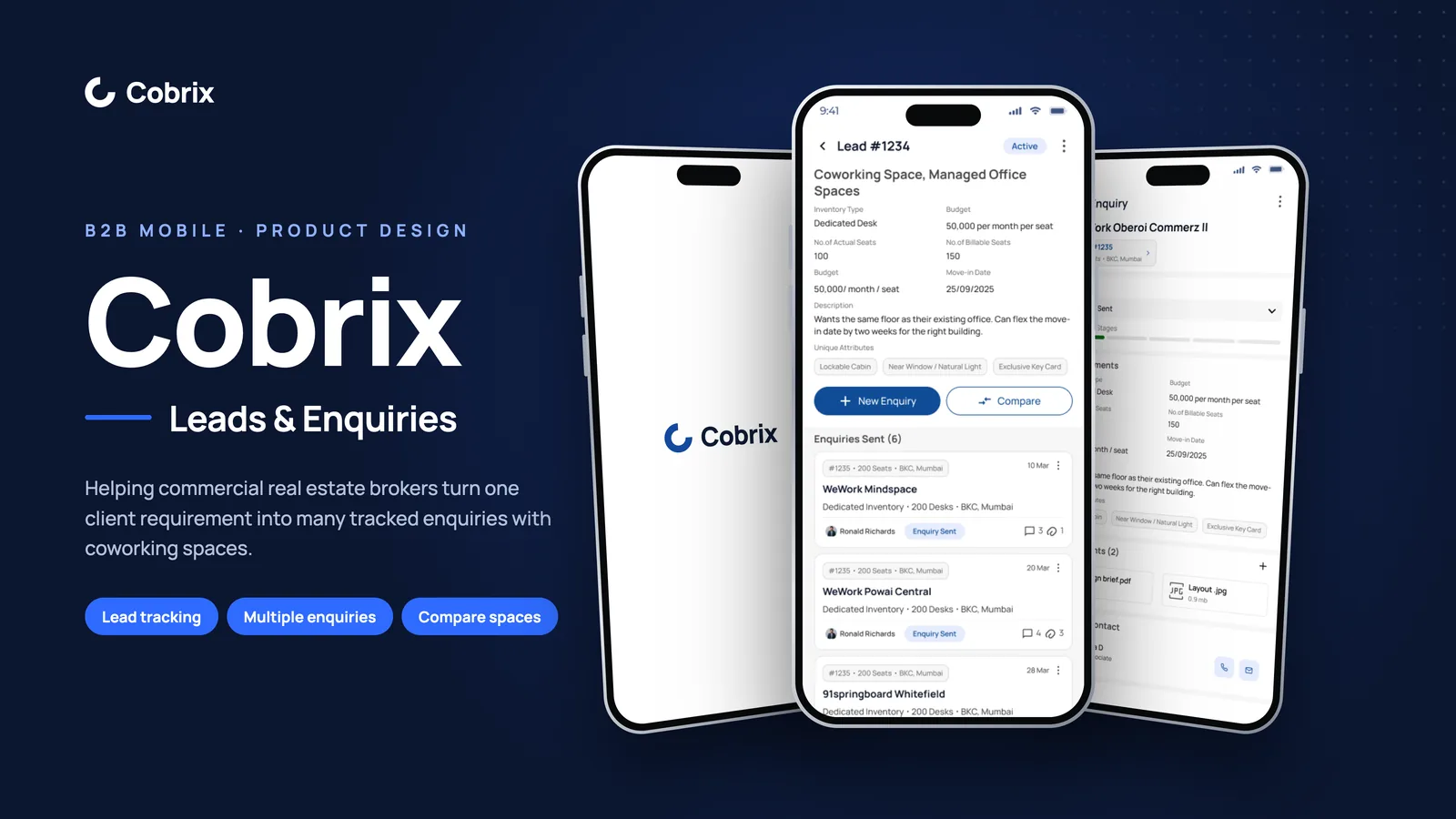
The problem wasn't finding a workspace. It's keeping track of every conversation around it.
Commercial real estate brokers take a client's requirement, contact several coworking spaces, and follow up with each one until the client chooses. When requirements and conversations are spread across messaging apps and spreadsheets, it's hard to see which spaces were contacted and how far each conversation has progressed.
Cobrix is a broker app built around two objects. A lead is one client requirement. An enquiry is one conversation with one coworking space about that requirement. This case study covers only leads and enquiries: how they're modeled, how brokers use them, and the design decisions behind them.
Create a connected workflow where the client requirement is captured once and the spaces being considered remain linked to it.
Objective
Design a workflow where a broker can:
- Record a client requirement once, with its location, desks, budget, and move-in date.
- Track each space conversation as its own enquiry, so one stalled space doesn't hide the others.
- See the stage of every enquiry at a glance.
- Understand what happens to open enquiries when a lead is won or closed.
Three recurring problems shaped the design direction
The CEO and Product Manager interviewed eight brokers about how they manage client requirements and provider conversations. I reviewed their findings with the PM, followed up on open questions, and did supplementary online research and a conversation with a coworking-space sales representative.
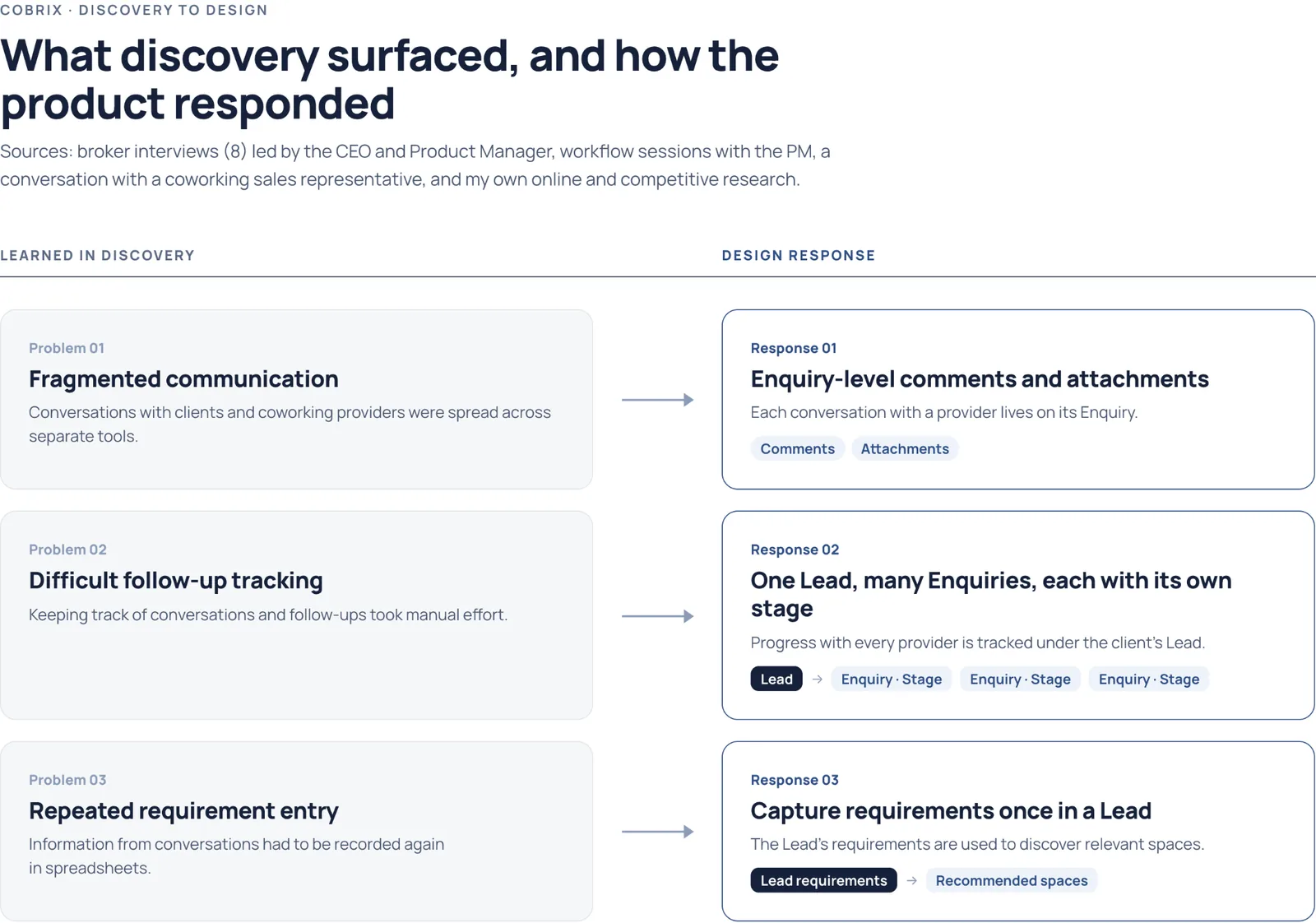
Conversations with clients and coworking providers were spread across separate tools. The design kept provider communication and supporting files attached to the relevant Enquiry.
One client requirement could lead to several workspace conversations. Linking each Enquiry to the Lead made it possible to track those options independently.
Structured Lead data became the basis for finding relevant coworking spaces, reducing the need to reconstruct the requirement each time.
The CEO and PM conducted the eight broker interviews. My contribution was reviewing the findings, supplementary desk research, competitive analysis, and a conversation with a coworking-space sales representative. I did not conduct the interviews.
Looking for a connected broker workflow
I reviewed real estate tools, broker-focused applications, and general sales CRM products. In the tools I examined, I identified an opportunity to connect one client requirement to multiple workspace enquiries, rather than treating each option as a disconnected opportunity.
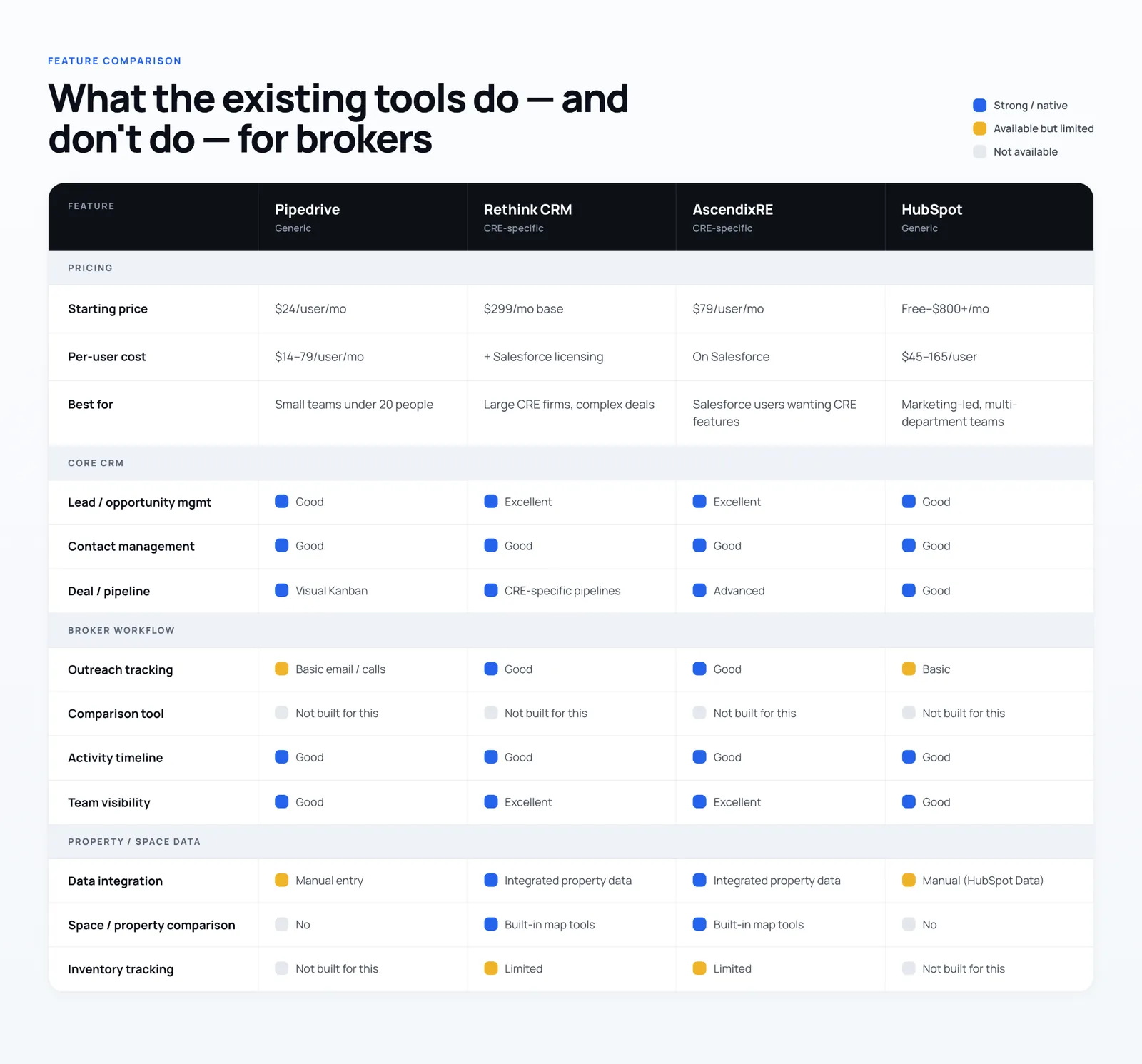
How might we give brokers one reliable place to manage a client requirement while keeping each workspace enquiry and its progress distinct?
One Lead, many Enquiries
My key contribution was proposing a Lead as the central record for a client's workspace requirement, with multiple Enquiries linked to it. A Lead captures the requirement; each Enquiry represents a potential workspace and its own provider conversation.
Options considered
| Option | Why I didn't choose it |
|---|---|
| Flat record: one row per client, with spaces listed as text | Stages and comments couldn't be tracked per space |
| Separate lead and enquiry apps | Brokers would have to cross-reference the two, which recreates the fragmentation |
| Lead with linked enquiries (chosen) | Each space keeps its own stage and history, and the requirement is entered once |
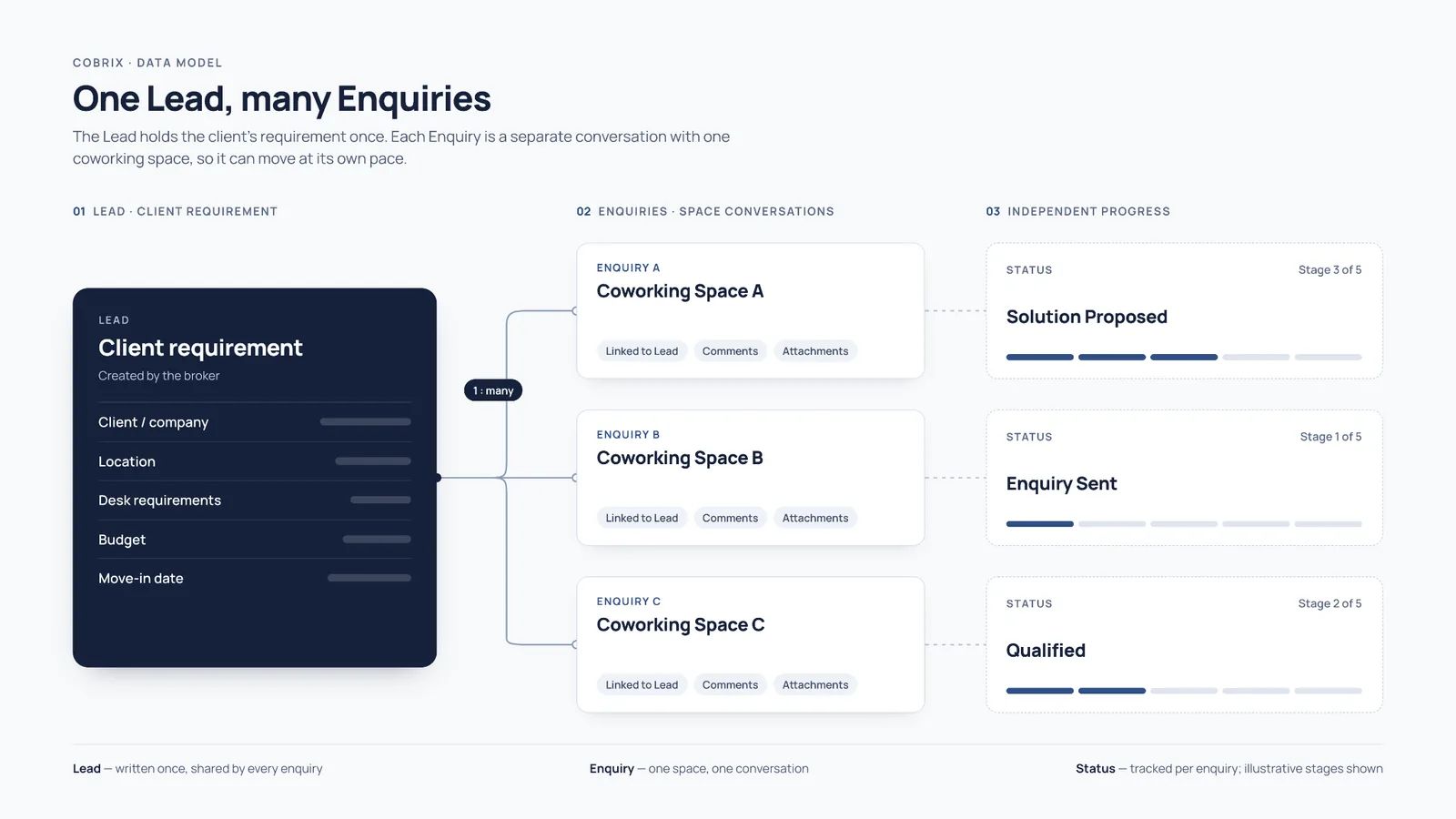
This model allowed a broker to close one unsuitable option without losing track of the others. It also provided a consistent structure for discovery, communication, comparison, and deal outcomes.
From client requirement to tracked Enquiries
The workflow starts when a broker receives a client requirement, creates a Lead, explores relevant spaces, reviews inventory, and sends Enquiries to selected providers. Enquiry progress and provider follow-up continue in a loop.
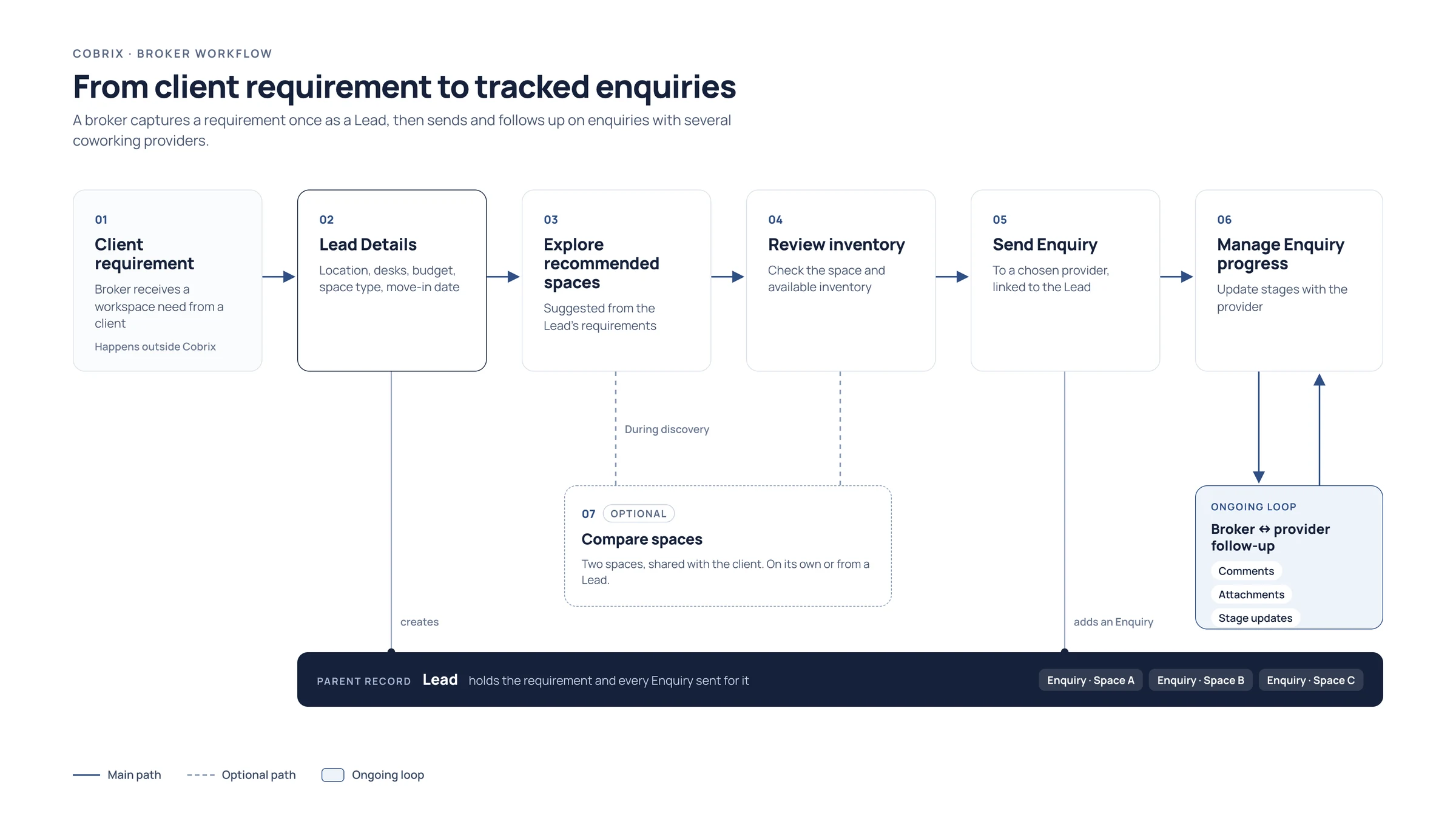
Comparison is optional and can happen independently or from within a Lead. It supports evaluation but is not a required step before sending an Enquiry.
Capturing requirements and managing multiple options
The mobile work combined adapting the existing workflow with mobile-specific design decisions. The aim was to preserve the Lead–Enquiry model while making the key information and actions usable on a smaller screen.
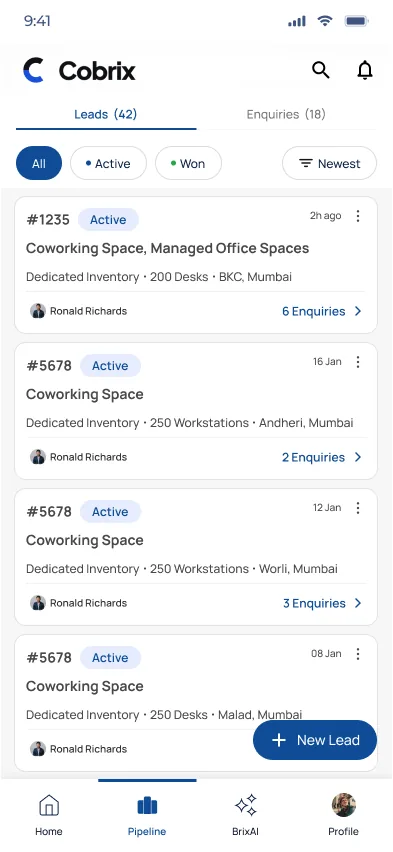
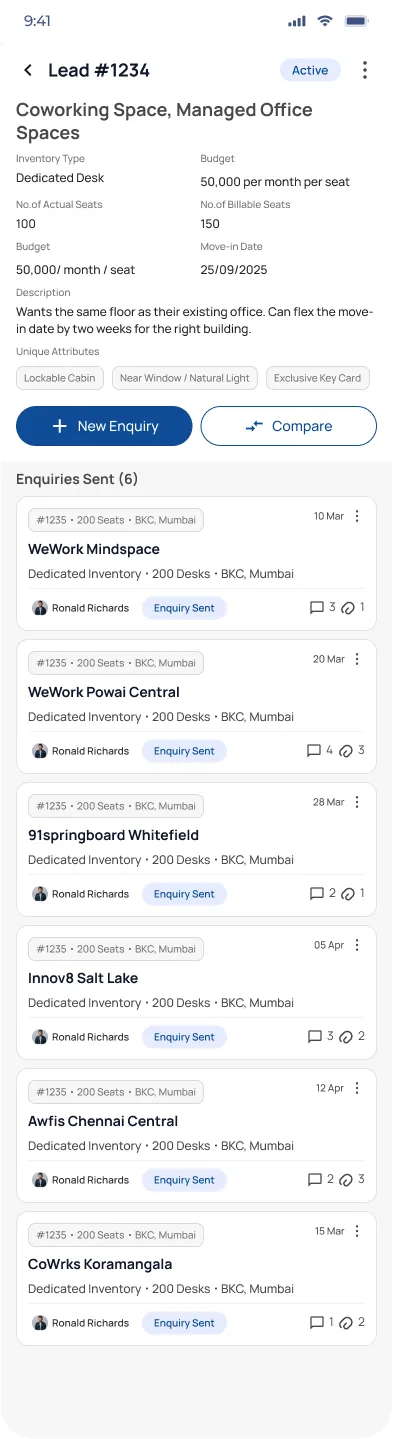
The Lead form captured company details, location, space type, desk requirements, budget, move-in date, and other attributes. Location and desk count were essential for matching; additional details helped narrow down suitable spaces.
Requirement-driven discovery
The system used Lead data to filter and rank suitable spaces from the available marketplace inventory. Brokers could inspect workspace details and availability before deciding which providers to contact.
Managing Enquiry progress
Each Enquiry has its own identifier, status, and reference back to the Lead. The stages in the designed pipeline are Enquiry Sent, Qualified, Solution Proposed, Negotiation, and Contracting.
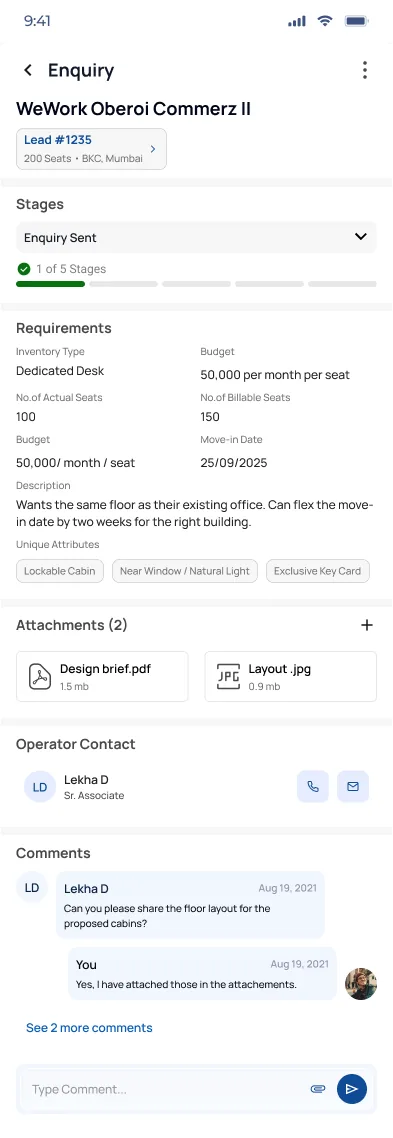
Comments and attachments live at the Enquiry level, so the discussion remains associated with the workspace it concerns.
Resolving a Won deal across related Enquiries
A Lead can have multiple Enquiries. When one workspace wins, the system needs to preserve a clear outcome for the selected option and handle the remaining options without forcing the broker to close each one manually.
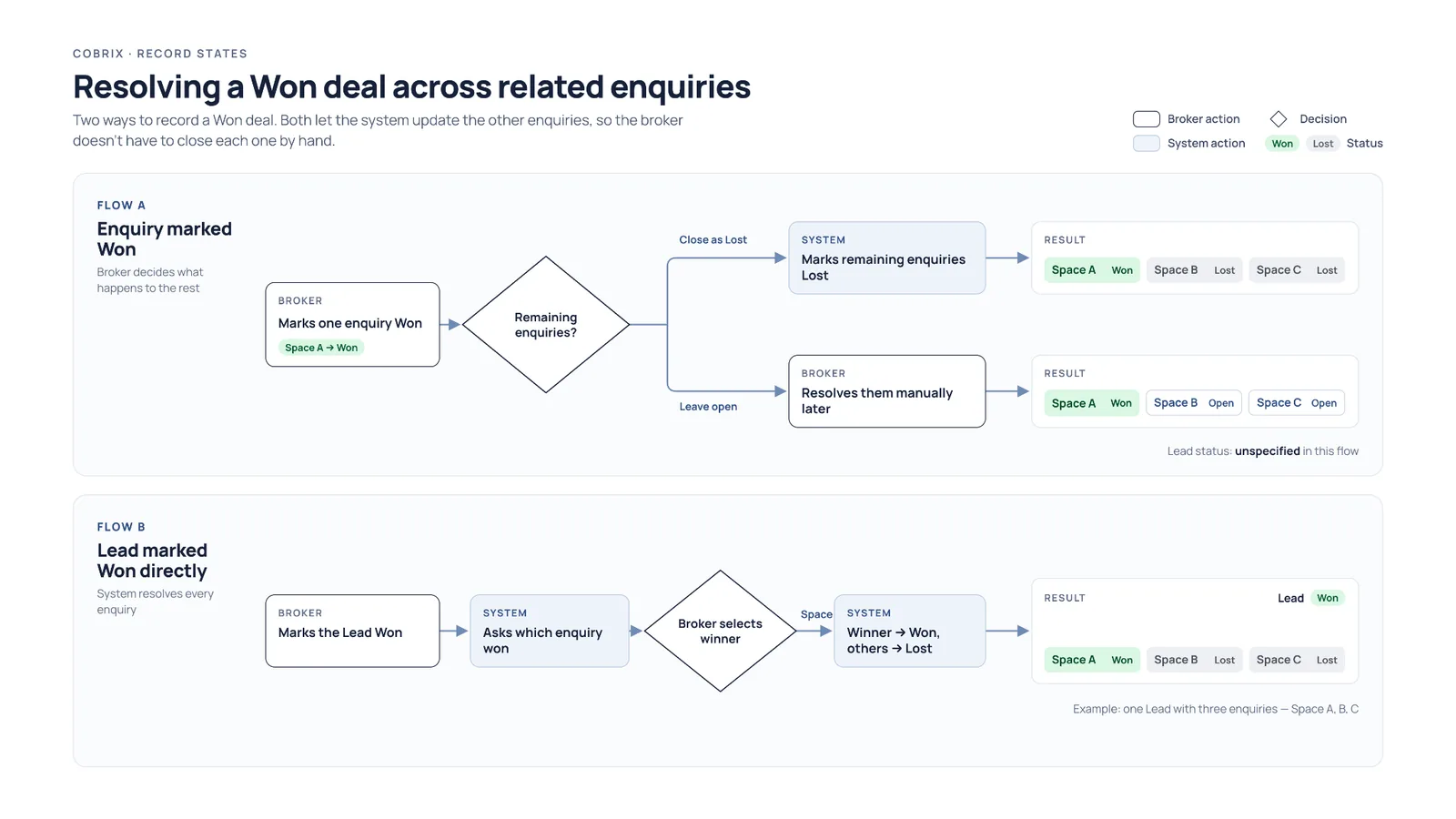
I discussed the bulk-closing behaviour with engineering before finalising the design. This helped account for implementation constraints and the different ways a deal could be marked as won.
Making the differences easier to scan
Brokers compare two spaces using commercial details, availability, location, capacity, and amenities. My initial design showed all fields in one view. As the information accumulated, the important differences were harder to scan.
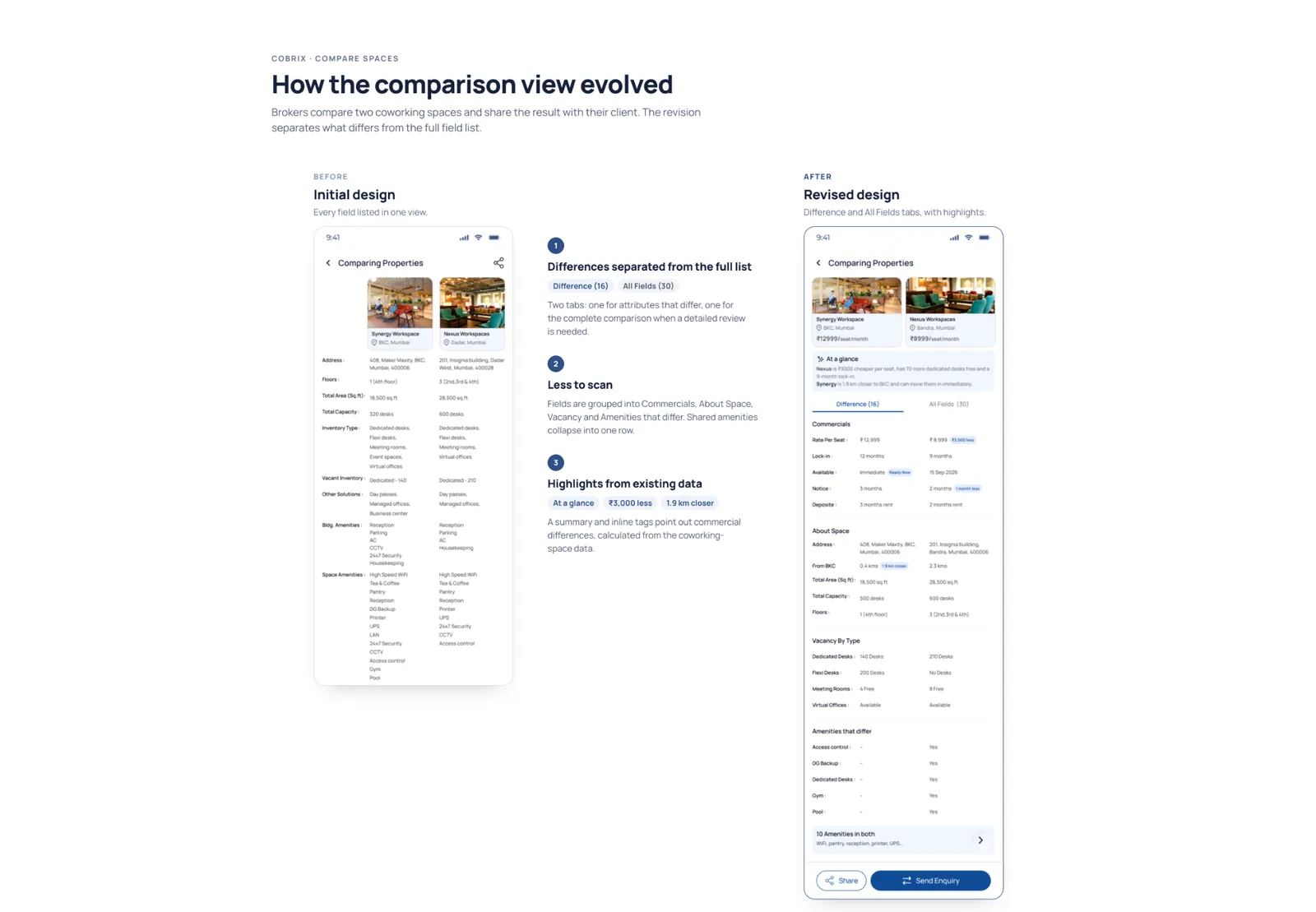
Focuses on attributes that vary between the selected spaces.
Provides the complete comparison for detailed review.
Where supported by the underlying data, highlights can surface useful trade-offs such as a lower deposit or shorter distance. The intention was to support quick evaluation without removing access to the full detail.
My role
I worked as one of two designers, collaborating with the PM, CEO, another designer, and developers over approximately three months.
- Reviewed existing research and conducted supplementary desk research and competitive analysis
- Defined and refined Lead and Enquiry workflows
- Designed user flows, wireframes, high-fidelity interfaces, and comparison patterns
- Built reusable components and contributed to the design system
- Prepared the PRD for the web Lead/Enquiry feature
- Adapted the core workflows and made additional design decisions for mobile
- Discussed edge cases and technical constraints with developers
Positive qualitative feedback; impact not yet measured
Feedback relayed by the PM and CEO indicated that brokers responded positively to the app concept and gave specific feedback on the proposed workflows. This was qualitative feedback, not the result of formal usability testing conducted by me.
What I would measure next
- Workflow efficiency: time to create a Lead and send relevant Enquiries
- Pipeline visibility: how effectively brokers track multiple Enquiries under one Lead
- Follow-up continuity: ability to find conversations and attachments in context
- Comparison usefulness: ability to identify key differences between shortlisted spaces
- Deal management: unresolved Enquiries after a Lead is marked Won
What this project taught me
The Lead–Enquiry model was the foundation for discovery, communication, comparison, and deal outcomes. Getting this relationship right made the rest of the experience easier to structure.
A client changing requirements, several open options, or one winning Enquiry among many can complicate a workflow. Exploring these cases early helped make the design more complete.
A feature being released is meaningful, but it does not prove that the intended problem has been solved. Without sufficient usage data or structured evaluation, the impact remains unmeasured.
Cobrix gave me the opportunity to contribute beyond individual screens and help shape a connected product workflow. My proudest contribution was introducing the Lead-to-Enquiry relationship and carrying that model through workspace discovery, comparison, edge-case handling, and mobile design.